
ShareGate
Microsoft 365 migration and governance, without the scripts.
Tools for IT teams to migrate to Microsoft 365 and keep Teams, SharePoint, Groups and OneDrive governed.
Products:ShareGate MigrateShareGate Protect
ShareGate
ShareGate, a Workleap product, builds Microsoft 365 tools trusted by more than 100,000 IT professionals. ShareGate Migrate moves content from SharePoint, file shares, Google Workspace, Box.com and mailboxes into Microsoft 365, and ShareGate Protect gives IT continuous visibility and governance across Teams, SharePoint, Groups and OneDrive. Protect surfaces oversharing, ownerless workspaces, stale guest access and sprawl, then guides safe, fully logged remediation using Microsoft-approved APIs. It complements Microsoft Purview and SharePoint Advanced Management rather than replacing them, and helps organisations prepare their tenant before rolling out Microsoft Copilot. ShareGate is bought by IT teams and Microsoft 365 service partners running migrations or governance programmes. Customers can license Migrate and Protect together, which suits organisations that need governance in place after a tenant move.

Key products
ShareGate MigrateShareGate Protect
Platforms
Why IT teams choose ShareGate
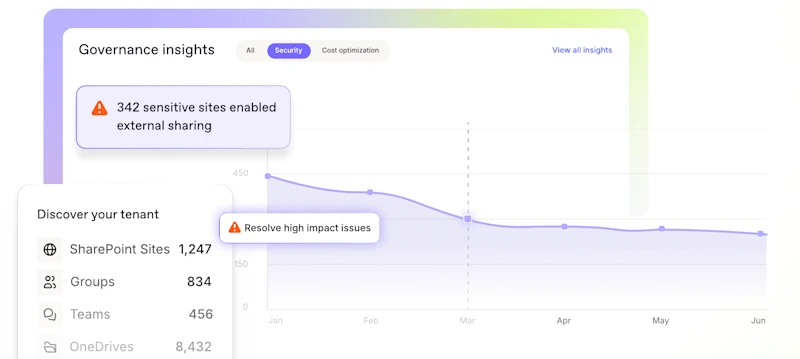
ShareGate Protect
You can't govern what you can't see
Microsoft Copilot does not create new access: it amplifies what already exists. ShareGate Protect shows IT who can see what and why, then helps tighten sharing links, confirm owners and remove inactive workspaces without disrupting collaboration.
- Licensed per Microsoft 365 user, guests excluded
- Every capability included, no tiers or add-ons
- Complements Microsoft Purview and SharePoint Advanced Management
Top Products
Popular ShareGate Products
Explore leading solutions from ShareGate.
